Where Cycle Time Quietly Disappears in Cobot Palletizer Cells
A cobot palletizer cell is more than an arm. It is the gripper, the infeed conveyor, the pallet dispenser, the sheet magazine, and the logic that sequences them. Published cycle times describe arm motion alone, but a real cell also carries slip sheets, tier changes, and the pattern re-sequencing that follows each one. Throughput is set by the slowest element in that chain, not by the number on the robot datasheet.
Three terms carry most of the weight in what follows. A slip sheet is a thin sheet of corrugated board, plastic or kraft paper placed between product layers, or between the load and the pallet, to stabilize the stack. A tier is one complete horizontal layer of cases in a load, and a pallet pattern is the layout that defines where each case sits in that layer and the order in which the arm places them.
In high-mix, low-volume palletizing, slip sheets and tier changes are the two recurring contributors to lost throughput that almost nobody measures. Sheet placement and sheet retrieval add moves no datasheet counts, and magazine position, sheet flatness and vacuum pickup time all vary from cycle to cycle. Tier changes interrupt the rhythm entirely: the arm finishes a layer, waits for a sheet, then restarts on a new pattern with a different pick order, different grip orientations and different reach limits. The lost seconds accumulate quietly, a few hundred milliseconds at a time, and they scale with SKU count rather than with volume.
That is why nameplate throughput and observed throughput rarely match on mixed-SKU lines, and why pallet pattern programming for mixed-SKU loads deserves as much attention as arm speed. Separating measured motion time from total cell cycle time is the only way to see what can be recovered.
Where Sheet Handling Enters the Cycle
A slip sheet touches a cobot palletizer cell at two separate points: placing an empty sheet before a layer is built, and retrieving or staging the next sheet so the cell is ready for the following cycle. Neither looks like much on a layout drawing. Both are full robot motion sequences in practice.
Before a single carton lands, the arm has to acquire a sheet, lift it clear of the stack or dispenser, move to the layer plane, square it to the pallet edges, lower under control, place, verify, release, and retreat. Those are separate actions, not one move, and the pallet cannot take its first case until the last one finishes.
The second moment arrives when the next sheet is fetched or staged. Whether it comes out of a magazine, off a dispenser lip, or off an operator-loaded stack, the robot still has to travel to that location, present the tool at the right orientation, separate what it wants from what it must leave behind, and come back. Staging the step earlier in the cycle helps; it does not remove the travel and approach moves.
None of this scales with robot speed. A faster arm shortens the transit portion and little else. Approach, orientation correction, placement verification and retreat are tied to the mechanics of the sheet and to getting the placement right, not to joint velocity. Pay for more speed and this slice of the cycle stays roughly where it was.
Mechanical Constraints That Dominate the Sequence
Stiffness and thickness set the approach. Thin sheets droop and need support across their face, so they demand a wider, gentler end effector and a slower descent. Thicker corrugated holds its shape but resists conforming to an imperfect layer, which pushes the arm to square and settle rather than drop straight down.
Corrugated and plastic behave like different materials. Corrugated is porous, absorbs humidity, and can drag against the sheet beneath it. Plastic is slicker and lighter, so it lifts easily but drifts and curls. Neither tolerates the same motion profile.
Flatness after storage is rarely as good as it was on arrival. Sheets pulled from a stack that has sat under load or in damp air come out curved. A curved sheet cannot be placed flat in one motion, so the robot ends up pressing, re-approaching, or accepting a corner that lifts.
Single-sheet separation and static cling are the quiet time sinks. Pulling one sheet off a stack while leaving the rest is a mechanical problem, not a motion problem. Plastic and coated sheets cling and come up in pairs; porous sheets grip the one below through friction. Solving it in the tool often costs an extra approach and shake-off motion per pick. Because the sheet handler and the carton handler are often not the same device, the cell may need a wider tool design vocabulary than the cartons alone would suggest, which is where the choice between vacuum and clamp gripper approaches stops being an abstract preference and starts showing up in cycle time.
Mixed-SKU lines pay for a context switch. Placing a sheet is not just another pick. It forces the cell to swap tool state or swap pattern context, then swap back. On a single-SKU pallet that is overhead paid once; on a high-mix line with frequent pattern changes, every sheet insertion interrupts the pattern logic mid-stack and the arm re-enters the carton sequence cold. The interruption is easiest to absorb when the mixed-SKU pattern setup treats sheet insertion as a named step rather than an afterthought.
Manual loading and automated dispensing move the delay rather than deleting it. With manual loading, the delay tends to land outside the robot cycle, on an operator who must reach into the cell or into a magazine at the right moment, which often means a safety interruption, a pause, or a wait state that is hard to see in a cycle-time chart. With an automated dispenser, the delay moves inside the cycle and becomes serialized with robot motion: visible and repeatable, but now bounded by the dispenser’s own release mechanics. The trade is variability against duration, and which one hurts depends on whether the line is losing throughput or losing predictability.
Every slip sheet or tier change takes a bite out of the cycle, and where that bite comes from depends on how the sheet reaches the stack. The table maps five common handling options against where their time goes, which is the comparison that matters during case-based throughput planning.
Slip sheet handling options and where cycle time goes
| Handling method | How the sheet is placed | Typical time exposure per sheet event | Tooling implication | Best fit on a high-mix, low-volume line | Main hidden cost |
|---|---|---|---|---|---|
| Manual operator placement at the cell | Operator walks the sheet onto the pallet by hand | High and variable, paced by the operator | None on the robot, but the cell needs an operator access zone | Only at low rates with rare tier changes | Labour time and inconsistent sheet placement |
| Dedicated sheet dispenser integrated with the conveyor infeed | Sheet injected upstream of the pick point | Low and repeatable per event, plus extra infeed dwell | Dedicated dispenser synchronised with conveyor logic | Strong when one sheet format dominates the mix | Changeover and re-tuning for every sheet format |
| Robot picks the sheet with the same end-of-arm tool | Cobot grabs the sheet like any other pick | Medium, one full pick-and-place move per sheet | Dual-purpose gripper with sheet sensing | Workable when sheets per pallet stay modest | Each sheet consumes a complete move budget |
| Pre-collated sheet-and-layer stacks supplied by the corrugator or co-packer | Stack is positioned, then the layer is lifted as one unit | Very low per sheet, amortised across the whole layer | Stack magazine and layer-level handling | Best for stable formats with a reliable sheet supply | Higher sheet purchase price and supplier lead time |
| Vacuum sheet magazine at the pallet build station | Vacuum head pulls the top sheet from the magazine | Low to medium, one vacuum pick per sheet | Vacuum head, magazine and filtration | Flexible across sheet sizes with fast swap-over | Compressed air draw and vacuum maintenance |
Source note: the time bands above are qualitative and must be verified against the cell’s own time study before they are used in a cycle-time or payback model.
Tier Changes: The Hidden Cycle Time Tax
A tier change is any moment the build logic stops repeating and starts re-deciding: a new layer whose pattern differs from the one below, a switch between interlocked and column-stacked layouts, or the handover from a finished pallet to a fresh one. None of it shows up as arm motion on a cycle time chart, which is why it gets underestimated.
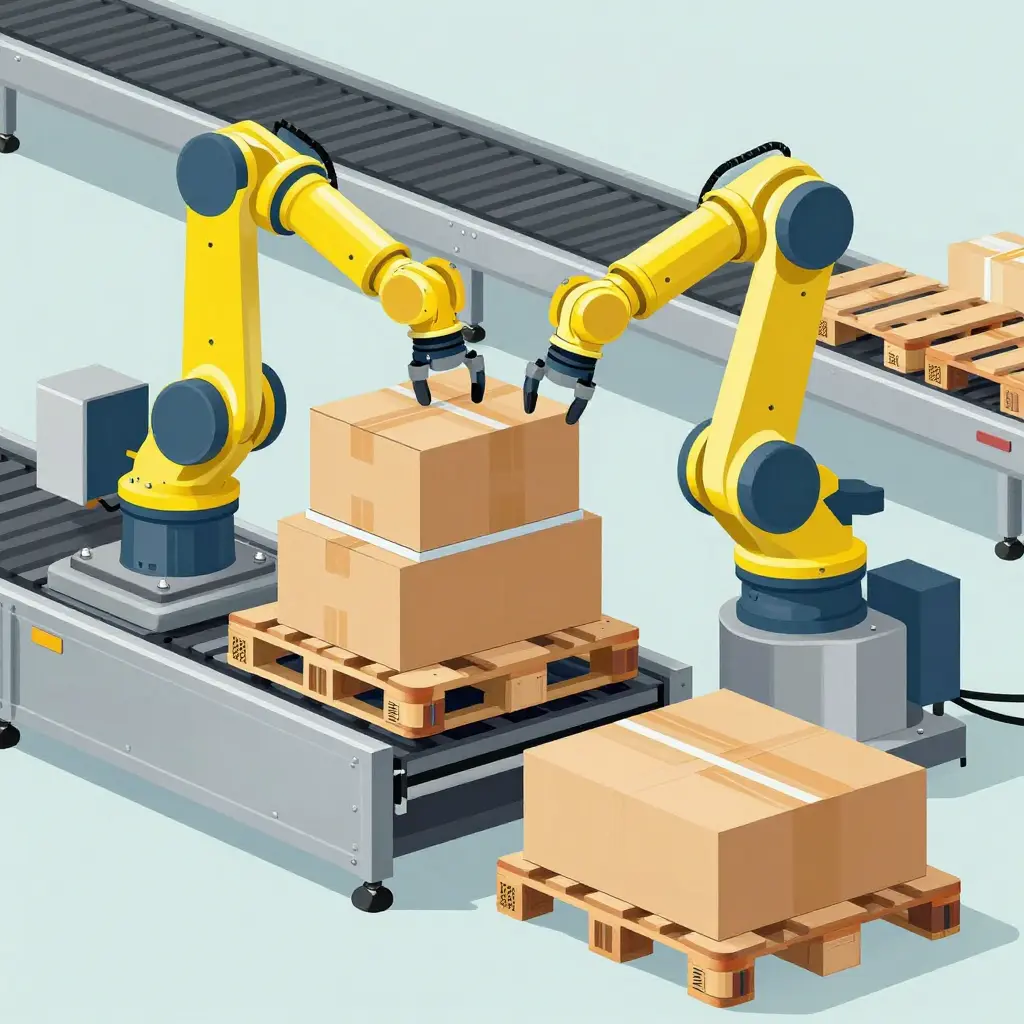
Three ways tier changes compound cycle time
- Pattern re-sequencing. A new tier usually means a new pick order, so the arm path, approach vectors and case release sequence from upstream all get rewritten on the fly.
- Pallet exchange or dispense interval. A completed pallet has to leave and an empty one has to arrive, and that gap is dead time unless the cell was designed to overlap it.
- Verification after tier completion. Layer integrity checks, slip sheet confirmation and pattern drift correction all land at the tier boundary, stacked on top of the transition itself.
The first effect alone can add seconds per tier because the pick plan is effectively recompiled. The second depends heavily on the layout you chose when weighing the trade-offs in the cell exchange choice between floor positions and a conveyor buffer. The third is administrative time that most throughput estimates never model at all.
Geometry-driven versus slip-sheet-driven tier changes
A geometry-driven change happens because the product itself forces it: a carton footprint that will not nest, a height limit that reshapes the top tiers, or a mixed-SKU blend that breaks the pattern mid-build. A slip-sheet-driven change happens because stability demands a separator, adding a pick, a placement and a settling moment the pattern would not otherwise need. The two frequently stack on the same cycle, because the tier where geometry finally forces a pattern shift is often the same tier that needs a slip sheet to keep the load together.
Cases-per-hour figures pulled from a catalogue rarely survive contact with a real mixed pallet for this reason. Working the arithmetic properly, the way throughput planning by cases versus by pallets does, exposes quickly enough how much of the gap sits at exactly these boundaries.
The conclusion worth repeating
Tier changes are structural, not accidental. They follow predictably from geometry, sheet insertion and pallet completion, so they have to be scheduled into the throughput model as real events with real duration. Trying to squeeze them out of the arm motion does not optimise anything; it moves the cost somewhere the spreadsheet cannot see.
Where the cycle time sits during one pallet build
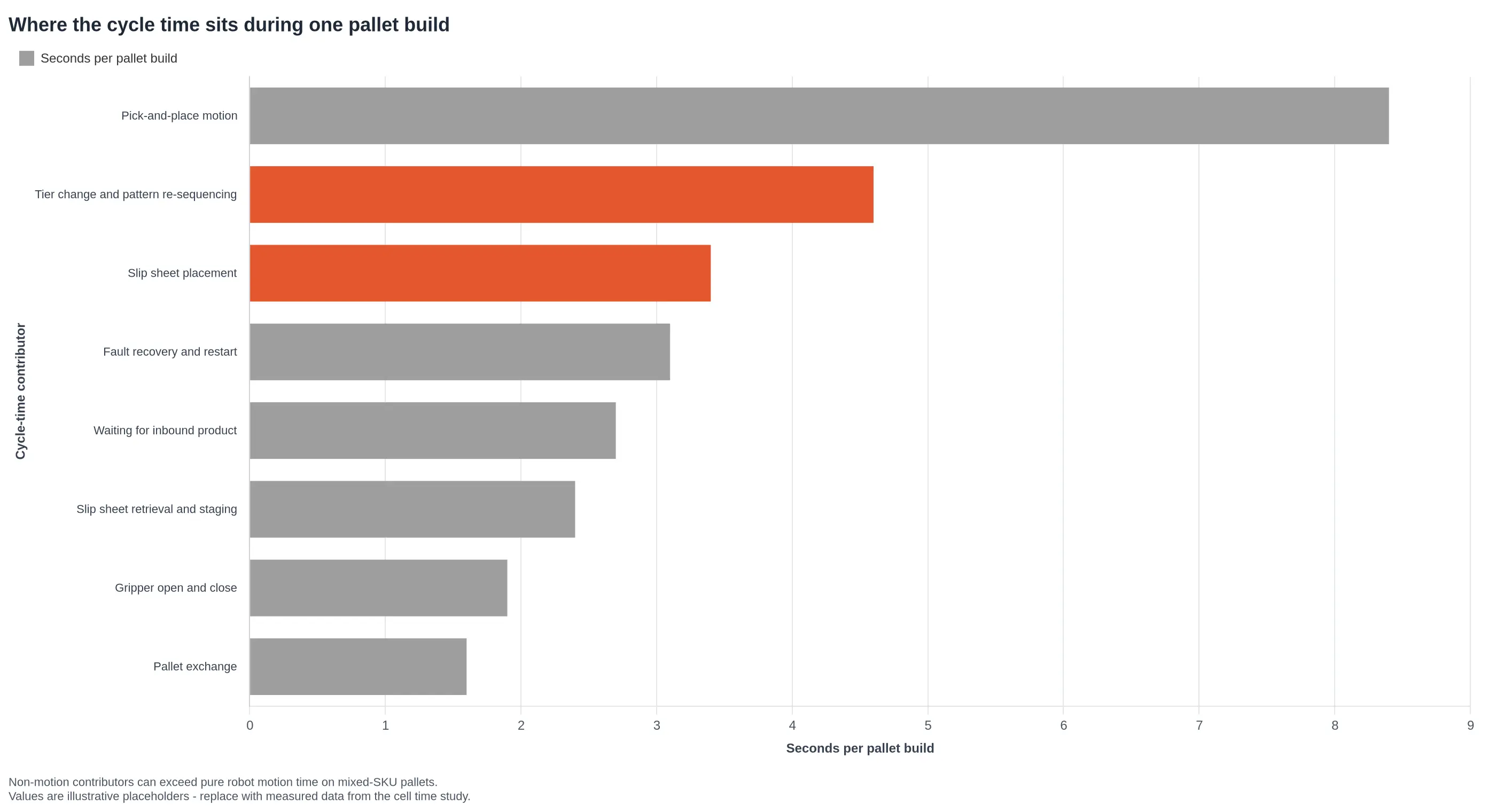
Bars run largest to smallest so the off-motion work stands out: pick-and-place motion (8.4 s) is the biggest single block, and the two slip sheet bars plus tier changes add up to roughly the same again. The numbers are illustrative placeholders, not cell data. A real pallet build reads in tens of seconds to minutes, not single digits, so treat the bars as proportions and replace them with your own stopwatch or PLC time-stamp results before quoting any throughput figure.
Non-motion contributors can exceed pure robot motion time on mixed-SKU pallets. If your line runs many pattern changes, review how mixed-SKU pallet patterns are configured before buying a faster arm.
Caption: Non-motion contributors can exceed pure robot motion time on mixed-SKU pallets.
Recovering the Lost Time
Lost cycle time rarely shows up as one big block. It leaks out in two-second waits, a gripper frozen over a sheet stack, a cell standing idle while someone walks the teach pendant through a new pattern. None of it looks dramatic on a stopwatch. Add it up across a shift on a high-mix line and it is the difference between a cell that pays for itself and one that gets quietly bypassed.
Most of that time can be recovered without touching the arm’s rated speed. Five levers do the work, and each one shows up in a number you can track.
Move sheet supply to pre-collated stacks. When the robot has to separate a single sheet from a magazine mid-cycle, every tier buys a hesitation, a vacuum re-check, and a risk of a double-pick. Pre-collated stacks deliver a ready-to-place sheet pack, so the sheet becomes one more pick in the motion plan rather than a separate sub-task. On a typical two-sheet-per-tier build, this shows up as seconds per pallet, and seconds per pallet is what converts into pallets per hour at the end of the shift.
Bury sheet placement inside a tool change that already exists. Many cells already pause for a gripper or tool change during the cycle. Sequence the sheet placement into that existing window instead of scheduling it as a standalone event on the timeline. You add no new stop; you fill one that was already there. Measured in pallets per hour, this is often the cheapest recovery available, because it costs motion planning rather than hardware.
Alternate pallet builds. Run two pallet stations in alternation so that a tier change on one pallet, or a full pallet exchange on the other, overlaps with the robot’s motion time on the adjacent build. The arm keeps stacking while the fork truck or operator does their part. This is a throughput lever, and it reads directly in pallets per hour rather than in arm speed.
Keep the pick plan resident in the controller. If every pattern change forces a fresh full re-teach, the cell is only as flexible as the technician’s calendar. A resident pick plan that the controller re-sequences on command turns a changeover into a menu selection. That shows up in pattern changeover minutes, moving the number from hours of tweaking into single-digit minutes.
Program patterns offline instead of discovering them in the cell. Running production hardware to find out whether a pattern works is the most expensive way to learn. Offline simulation lets engineers build, collide-check, and validate patterns away from the line, then load them in. Pattern programming and offline simulation covers how that workflow protects production hours.
Put those five together and the arithmetic is unglamorous but real: fewer seconds per pallet, more pallets per hour, changeover in minutes instead of afternoons. That combination usually decides whether a project clears the hurdle rate, which is why the return calculation should run against recovered time rather than against nominal arm speed.
Recovery comes from cycle architecture, not from a faster arm. A quicker robot bought to fix sheet hesitation and tier-change dead time is the palletizing version of buying a faster car to beat traffic. Rework the sequence, pre-collate the sheets, overlap the exchanges, keep pattern intelligence in software where it belongs, and the same arm produces noticeably more pallets in the same hour.
What to ask before signing off on the cell design
Slip sheets and tier changes are where quoted cycle times quietly leak away. Before you approve the layout, put these eight questions to your integrator and ask for numbers, not assurances. Then hold the answers against your pilot runs and acceptance criteria.
- How is each slip sheet separated from the stack and presented to the gripper, and what air pressure or vacuum level makes that reliable?
- Is sheet placement counted inside the robot’s motion time or added on top of it, and what is the measured difference in seconds?
- How many tier changes does the pattern require per pallet, and what is the time cost of each one?
- What happens to the cycle when a sheet jams or double-feeds, and how many seconds does recovery take?
- Does the pallet exchange overlap with the build, or does the robot stand idle while the full pallet leaves?
- How are new patterns loaded, by teach pendant, offline file, or recipe download, and how long does one changeover take?
- Which counters does the cell log for sheet events and tier events, and can you export them per shift?
- What exactly does the throughput guarantee cover in pallets per hour, and does that figure include sheet handling?
Where sheet handling sits in the cycle
Read the cell the way the controller does and it falls into three zones: sheet supply on one side, the robot’s reach envelope in the middle, the pallet build position on the far side. Only two sheet events belong to a tier, and both sit inside that envelope: an empty sheet placed on the pallet before the layer is built, and the next sheet already staged so it is ready the moment the tier closes.
In sequence:
- Sheet drawn from the magazine or stack and carried toward the pallet.
- Empty sheet placed on the pallet surface, or on top of the finished tier.
- Layer build sequence runs over the inserted sheet.
- Next sheet pulled and staged while the layer is still being built.
That last step is the whole trick. When staging overlaps the layer build, sheet handling largely hides inside cycle time instead of adding to it; when it is sequenced afterwards, every tier pays for it twice. Because both sheet events sit inside the same reach envelope as the case picks, magazine position and pallet placement deserve as much layout attention as the robot itself, and so do the pickup zones and operator walkways around them.
FAQ: Slip Sheets, Tier Changes and Cycle Time
Do slip sheets always cost cycle time in a cobot palletizer cell?
Not always. A sheet drawn from a magazine during the case pick cycle adds almost nothing. The cost appears only when slip sheets need their own motion or a separate placement step. In a cobot palletizer, a steady sheet supply keeps that penalty small.
Can the robot place slip sheets and cases with the same end-of-arm tool?
Yes, with the right design. A vacuum tool with a sheet zone and a case zone handles both, as long as sheet thickness and porosity are stable and the sheet zone sits clear of the case footprint. Check hold force on your thinnest slip sheets.
How many tier changes per pallet are normal on a mixed-SKU line?
On a mixed-SKU line, plan for one to five distinct tier changes per pallet, with high-mix patterns at the top of that range. Each change costs a pattern switch and often a gripper check, so review pattern flexibility and cycle time trade-offs before you commit.
Can offline simulation predict slip sheet and tier change time before installation?
It predicts well enough to plan, not precisely enough to promise. Slip sheets, tier changes and layer sequencing can all be modelled, and the results hold within a few tenths of a second per layer. Validate on the real cell.
When does a dedicated sheet dispenser make more sense than manual sheet loading?
Choose a dispenser when the cell needs slip sheets every one or two layers and manual loading would pull an operator back to the cell constantly. Below roughly one sheet per pallet, manual loading is cheaper and simpler to maintain.
Closing: Measure the Cell, Not the Spec Sheet
A robot’s rated pick rate describes a machine in isolation. Throughput describes a cell in motion. The gap between the two is where slip sheet placement, sheet retrieval, tier interleaving, and pattern resets live, and those events belong to the total cycle, not to a footnote. Until they are added into the timeline, any capacity forecast describes something other than production.
Before a design is frozen, run a time study across ten consecutive pallet builds spanning at least three SKUs. Record every sheet event and every tier change as its own line item, with the average and the worst case side by side, then build the throughput model from those numbers rather than from datasheet figures. Ten builds will expose the variability that a single demonstration cycle hides.
ZBOSN designs and manufactures cobot palletizers in-house and offers tailored OEM/ODM cooperation for integrators, and its breakdown of hardware versus integration cost structure is a useful reference when scoping a cell budget.